Tip Toe in My Jordans, with you in it. Make my video
Tip Toe in My Jordans AI: Free Two-Photo Dance Video Generator (2026)
Add a Dancer photo and a Partner photo. About 2 to 4 minutes later, your own barn-dance video is ready to post.
- Free 5s preview · 12s HD from $4.90
- 9:16 or 16:9
- No watermark
- No subscription
See the dance first, then make yours
These three reference clips were posted on social media and show the moves our template follows. Each one is credited to the person who posted it.
- Reference
The sparkly tuxedo original
The clip that set the template: a dancer in a sequin tuxedo hushes the camera, grins and tiptoes through the straw while a woman reacts.
- Reference
The red jersey remix
Same beats, new cast: a dancer in a basketball jersey shushes, grins and spreads her arms while her partner gasps.
- Reference
The red dress remix
Pearls, a red dress and big arm swings, with a friend watching in disbelief.
Reference videos are shown for illustration, not as a promise of identical output. Faces, motion and sound change with your photos.
The meme, explained
What is the Tip Toe in My Jordans trend?
Tip Toe in My Jordans (also written Tip Toeing in My Jordans) is a short AI-made video meme set in a hay barn. A dancer raises a finger to the lips, grins, spreads both arms and tiptoes through the straw while a second person reacts in shock. Many edits pair the clip with Riff Raff’s song “Tip Toe Wing in My Jawwdinz”.
According to Know Your Meme, the AI clip first appeared on Instagram in August 2026. Song-led edits spread on TikTok and X in late September and early October, followed by remixes with other people, characters and pets. It is not a scene from the 1987 movie Rumpelstiltskin, although the retro fairytale look made many viewers call the dancer by that name.
Tip Toe AI lets you play both roles with your own photos. A fixed template sets the barn, the camera cuts and the dance, so you never write a prompt. The site is an independent tool and has no link to Riff Raff, the original posters or any film.
Read more: Instagram topic page · Know Your Meme search
What happens in a Tip Toe video
A 12-second video follows six beats. These stills come from a reference remix, and the shot timings are approximate.
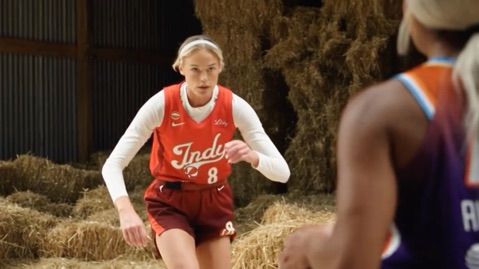
01 · 0–1s
Set the barn
The Dancer faces the Partner among the hay bales and starts a playful hush.
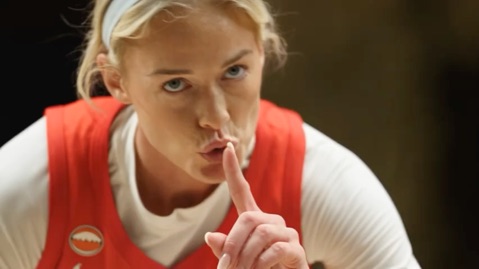
02 · 1–2s
A little hush
Close-up on the Dancer, finger to the lips, eyes locked on the Partner.
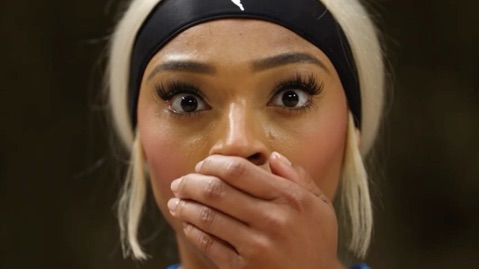
03 · 2–3s
Cue the surprise
Cut to the Partner: eyes wide and a hand over the mouth.
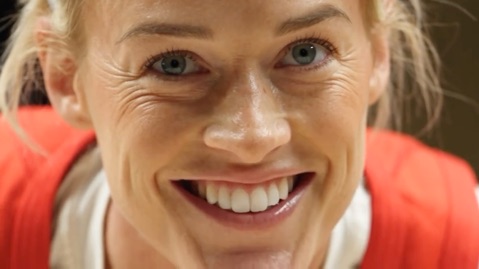
04 · 3–4s
The grin
Back to the Dancer as the straight face turns into a knowing smile.
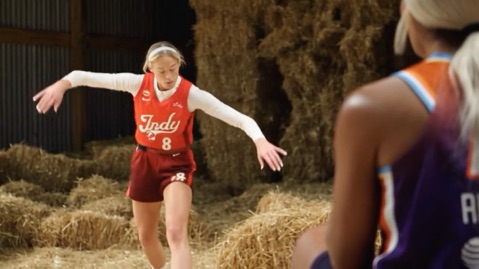
05 · 4–6s
Arms wide
A medium shot: both arms open, knees bend and shoulders sway to the beat.
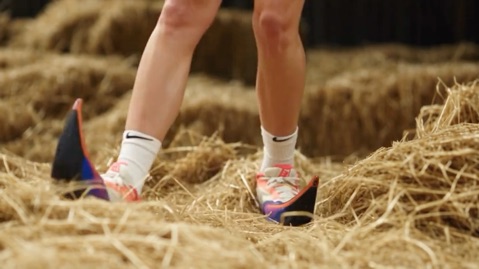
06 · 7–11s
Eyes on the feet
A low shot follows the footwork as the Dancer tiptoes through the straw.
Your photos decide who plays each role. The template decides the scene, shots and rhythm, and every result comes out a little different.
How to make a Tip Toe in My Jordans video in 3 steps
No dance practice, no prompts and no editing app.
Add your two photos
Upload one clear photo for the Dancer and one for the Partner. JPG, PNG or WebP, up to 10 MB each.
Try the free preview
Pick 9:16 or 16:9, tick the photo-consent box and log in. You get a free 5-second 480p preview.
Make the full video
Spend 100 credits on a 12-second 720p video. You can close the page while it renders and find it in My videos.
Why people use it
Fast
About 2 to 4 minutes from upload to a finished MP4.
No editing
No timeline, no prompt and no template hunt in a video app.
Built for this one meme
The barn, the hush, the shocked look and the tiptoe are set by the template.
No subscription
Buy credits once. They never expire.
Free preview first
See your faces in motion before you spend anything.
Works on your phone
Pick photos from your camera roll and download a video ready for TikTok, Reels or Shorts.
Which photos work?
Two photos in total: one Dancer and one Partner, each showing a single face.
Works well
- A clear, well-lit photo of one person or one pet
- Face turned toward the camera and not covered
- JPG, PNG or WebP, up to 10 MB
- Between 300 and 6000 pixels on each side
Avoid
- Group photos with several faces
- Sunglasses, masks or heavy filters over the face
- Very blurry or very dark pictures
- Photos of anyone who has not agreed, celebrities or minors
Limits: width-to-height ratio between 0.4 and 2.5. Upload only yourself or adults who agreed.
One-time credit packs
Preview for free, then pay only for the videos you keep. One full 12-second video costs 100 credits.
100 credits
$4.90
1 video
≈ $4.90 / video
One-time payment, no subscription
- Most popular
300 credits
$9.90
3 videos
≈ $3.30 / video
One-time payment, no subscription
800 credits
$19.90
8 videos
≈ $2.49 / video
One-time payment, no subscription
- Secure checkout by Waffo
- Instant credits
- 7-day refund on unused packs
- Failed videos refunded
Tip Toe in My Jordans AI: frequently asked questions
Is it free to try?
Yes. Each account gets 1 free 5-second 480p preview, once for life, and one free preview is given per network every 30 days. The full 12-second 720p video needs 100 credits, with packs from $4.90.
How many photos do I need?
Two: one Dancer and one Partner. Each is a JPG, PNG or WebP file up to 10 MB. Both roles need a clear face, and a pet photo works for either role.
How long does it take?
About 2 to 4 minutes for most videos. You can close the page and come back, because finished videos wait in My videos.
Does the video use the original song?
No. The music is an original AI-generated beat. To use the real track, add it in TikTok from Sounds when you post. The song guide explains how.
Is there a watermark?
No. Both the free preview and the full video are delivered without a watermark.
Can I make it with a pet or friends?
Yes. Any two subjects can play the roles, though results vary with the photo. Run the free preview first to check the faces.
Is this connected to Riff Raff or the movie?
No. Tip Toe AI is an independent AI tool with no link to Riff Raff, the original posters or any film. Read the movie question for the background.
What if a video fails or I want a refund?
A failed generation returns its credits automatically. Packs you have not used can be refunded within 7 days; see the refund policy.
What is the video where someone shushes the camera and tiptoes through a barn?
That is the Tip Toe in My Jordans trend: a barn dance with a hush, a grin and tiptoe footwork while a partner reacts in shock. Tip Toe AI recreates it with your own two photos. The movie question explains where it comes from.
How long are my photos kept?
Photos are stored privately and deleted automatically 14 days after upload, or sooner if you delete your account. Finished videos stay in My videos until you delete them. The privacy policy has the details.
Ready to join the barn dance?
Two photos, one free preview and a finished video in minutes.
Make my videoYour photos. A little footwork.
Free 5-second preview, then 12-second HD from $4.90.
Start with my photosQuestions? Email support@tiptoeinginmyjordans.dev.
Tip Toe AI is an independent AI tool. Not affiliated with Riff Raff, the original posters or any film.